<?xml version="1.0" encoding="utf-8"?>
<feed xmlns="http://www.w3.org/2005/Atom">
    <title>Play with Weblog!</title>
    <link rel="alternate" type="text/html" href="http://luna.s60.xrea.com/" />
    <link rel="self" type="application/atom+xml" href="http://luna.s60.xrea.com/atom.xml" />
   <id>tag:luna.s60.xrea.com,2006://1</id>
    <link rel="service.post" type="application/atom+xml" href="http://luna.s60.xrea.com/x/mt-atom.cgi/weblog/blog_id=1" title="Play with Weblog!" />
    <updated>2006-10-11T00:10:12Z</updated>
    <subtitle>XREAでMTを遊んでみよう！</subtitle>
    <generator uri="http://www.sixapart.com/movabletype/">Movable Type  3.33-ja</generator>
 
<entry>
    <title>3.33にバージョンアップ</title>
    <link rel="alternate" type="text/html" href="http://luna.s60.xrea.com/archives/2006/10/11-909.html" />
    <link rel="service.edit" type="application/atom+xml" href="http://luna.s60.xrea.com/x/mt-atom.cgi/weblog/blog_id=1/entry_id=87" title="3.33にバージョンアップ" />
    <id>tag:luna.s60.xrea.com,2006://1.87</id>
    
    <published>2006-10-11T00:09:21Z</published>
    <updated>2006-10-11T00:10:12Z</updated>
    
    <summary>セキュリティ対策の3.33がリリースされてしばらく経過しましたので、バージョンア...</summary>
    <author>
        <name>るな</name>
        
    </author>
            <category term="2MT" />
    
    <content type="html" xml:lang="ja" xml:base="http://luna.s60.xrea.com/">
        セキュリティ対策の3.33がリリースされてしばらく経過しましたので、バージョンアップを行いました。
「mt-config.cgi」以外をアップして終了です。
        
    </content>
</entry>
<entry>
    <title>コメントとトラックバックのシンプル表示</title>
    <link rel="alternate" type="text/html" href="http://luna.s60.xrea.com/archives/2006/07/19-1258.html" />
    <link rel="service.edit" type="application/atom+xml" href="http://luna.s60.xrea.com/x/mt-atom.cgi/weblog/blog_id=1/entry_id=86" title="コメントとトラックバックのシンプル表示" />
    <id>tag:luna.s60.xrea.com,2006://1.86</id>
    
    <published>2006-07-19T03:58:44Z</published>
    <updated>2006-07-19T04:13:59Z</updated>
    
    <summary>「SimmpleComment」と「CPEntries」を使って、コメントとトラ...</summary>
    <author>
        <name>るな</name>
        
    </author>
            <category term="6plugin" />
    
    <content type="html" xml:lang="ja" xml:base="http://luna.s60.xrea.com/">
        <![CDATA[「<a href="http://kalsey.com/2006/07/simplecomments_and_mt_33_fixed/" target="_blank">SimmpleComment</a>」と「<a href="http://factage.com/yu-ji/archives/2004/06/08/cpentries-plugin-for-movabletype/" target="_blank">CPEntries</a>」を使って、コメントとトラックバックをシンプルに表示してみるTipsです。
※ここのサイトでは導入しておりません。]]>
        <![CDATA[「トラックバックもコメントである」という思想の元に、トラックバックとコメントを一元化して表示させるプラグインが、「<a href="http://kalsey.com/2006/07/simplecomments_and_mt_33_fixed/" target="_blank">SimmpleComment</a>」です。
こちらのプラグインの表示方法を拡張するプラグインとして「<a href="http://factage.com/yu-ji/archives/2004/06/08/cpentries-plugin-for-movabletype/" target="_blank">CPEntries</a>」を使わせていただきました。
詳細は各ページをご覧いただくとして、わたしが記述したテンプレートは以下の通りです。
<blockquote>&lt;h2&gt;Comments&amp;Trackbacks&lt;/h2&gt;
&lt;MTCPEntries lastn=&quot;10&quot; sort_order=&quot;descend&quot;&gt;
&lt;MTCPEntry&gt;
&lt;ul&gt;&lt;strong&gt;&lt;a href=&quot;&lt;$MTEntryPermalink$&gt;&quot;&gt;&lt;$MTEntryTitle trimj_to=&quot;30&quot;$&gt;&lt;/a&gt;&lt;/strong&gt;
&lt;MTSimpleComments lastn=&quot;10&quot; moderate=&quot;0&quot;&gt;
&lt;MTSimpleCommentIfComment&gt;
&lt;li&gt;(C) &lt;a href=&quot;&lt;$MTEntryPermalink$&gt;#C&lt;$MTCommentID$&gt;&quot;&gt;&lt;$MTCommentAuthor$&gt;(&lt;$MTCommentDate format=&quot;%m/%d&quot;$&gt;)&lt;/a&gt;&lt;/li&gt;
&lt;/MTSimpleCommentIfComment&gt;
&lt;MTSimpleCommentIfTrackback&gt;
&lt;li&gt;(T) &lt;a href=&quot;&lt;$MTEntryPermalink$&gt;#T&lt;$MTPingID$&gt;&quot;&gt;&lt;$MTPingBlogName trimj_to=&quot;20&quot;$&gt;(&lt;$MTPingDate format=&quot;%m/%d&quot;$&gt;)&lt;/a&gt;&lt;/li&gt;
&lt;/MTSimpleCommentIfTrackback&gt;
&lt;/MTSimpleComments&gt;
&lt;/ul&gt;
&lt;/MTCPEntry&gt;
&lt;/MTCPEntries&gt;</blockquote>]]>
    </content>
</entry>
<entry>
    <title><![CDATA[エントリの中の&lt;&gt;を&amp;lt;と&amp;gt;に変換する]]></title>
    <link rel="alternate" type="text/html" href="http://luna.s60.xrea.com/archives/2006/07/15-1153.html" />
    <link rel="service.edit" type="application/atom+xml" href="http://luna.s60.xrea.com/x/mt-atom.cgi/weblog/blog_id=1/entry_id=85" title="エントリの中の&amp;lt;&amp;gt;を&amp;amp;lt;と&amp;amp;gt;に変換する" />
    <id>tag:luna.s60.xrea.com,2006://1.85</id>
    
    <published>2006-07-15T02:53:25Z</published>
    <updated>2006-07-15T04:33:25Z</updated>
    
    <summary>ついでに、エントリー画面の修正を行いました。 参考にしたのはこちらのサイト &gt;&gt;...</summary>
    <author>
        <name>るな</name>
        
    </author>
            <category term="5custmize" />
    
    <content type="html" xml:lang="ja" xml:base="http://luna.s60.xrea.com/">
        <![CDATA[ついでに、エントリー画面の修正を行いました。
参考にしたのはこちらのサイト
>><a href="http://teatime.studio-dip.com/archives/2006/05/04entrycus.php" target="_blank">エントリー画面のカスタマイズ</a>
修正するのは「mt-static/mt.js」と「mt/tmpl/cms/edit_entry.tmpl」。]]>
        <![CDATA[まずは「<strong>mt-static/mt.js</strong>」のカスタマイズ。どこでもいいので、下記の文を追加します。
<blockquote>function formatChars(e) {
&nbsp;&nbsp;if (!canFormat) return;
&nbsp;&nbsp;var str = getSelected(e);
&nbsp;&nbsp;if (!str) return;
&nbsp;&nbsp;tmp = str.split('&amp;').join('&amp;amp;');
&nbsp;&nbsp;tmp = tmp.split('&lt;').join('&amp;lt;');
&nbsp;&nbsp;tmp = tmp.split('&gt;').join('&amp;gt;');
&nbsp;&nbsp;tmp = tmp.split('&quot;').join('&amp;quot;');
&nbsp;&nbsp;setSelection(e, tmp);
&nbsp;&nbsp;return false;
}</blockquote>

次は「<strong>mt/tmpl/cms/edit_entry.tmpl</strong>」のカスタマイズ。
エントリー本文に入れる場合は、525行目付近の
「<strong>&lt;label for=&quot;text&quot;&gt;&lt;MT_TRANS phrase=&quot;Entry Body&quot;&gt;&lt;/label&gt;</strong>」を目印に
「if (canFormat) {」の中に
<blockquote>write('&lt;a title=&quot;&lt;MT_TRANS phrase=&quot;HTMLSpecialChars&quot;&gt;&quot; href=&quot;#&quot; onclick=&quot;return formatChars(document.entry_form.text)&quot;&gt;&lt;img src=&quot;&lt;TMPL_VAR NAME=STATIC_URI&gt;images/html-chars.gif&quot; alt=&quot;&lt;MT_TRANS phrase=&quot;HTMLSpecialChars&quot;&gt;&quot; width=&quot;26&quot; height=&quot;19&quot; /&gt;&lt;/a&gt;');</blockquote>

を追加します。
それから、追記部分にも入れたい場合にはそのもう少し下、565行目付近の
「<strong>&lt;label for=&quot;text_more&quot;&gt;&lt;MT_TRANS phrase=&quot;Extended Entry&quot;&gt;&lt;/label&gt;</strong>」を目印に同様に<blockquote>write('&lt;a title=&quot;&lt;MT_TRANS phrase=&quot;HTMLSpecialChars&quot;&gt;&quot; href=&quot;#&quot; onclick=&quot;return formatChars(document.entry_form.text_more)&quot;&gt;&lt;img src=&quot;&lt;TMPL_VAR NAME=STATIC_URI&gt;images/html-chars.gif&quot; alt=&quot;&lt;MT_TRANS phrase=&quot;HTMLSpecialChars&quot;&gt;&quot; width=&quot;26&quot; height=&quot;19&quot; /&gt;&lt;/a&gt;');</blockquote>

を追加してください。
画像の方はもし良かったらこれ拾ってください。
<img src="http://luna.s60.xrea.com/x/mt-static/images/html-chars.gif" width="26" height="19">
この画像を「mt-static/images/html-chars.gif」に保存し先の二つのファイルと同じにアップロードしてください。]]>
    </content>
</entry>
<entry>
    <title>MT3.31にアップ</title>
    <link rel="alternate" type="text/html" href="http://luna.s60.xrea.com/archives/2006/07/15-1042.html" />
    <link rel="service.edit" type="application/atom+xml" href="http://luna.s60.xrea.com/x/mt-atom.cgi/weblog/blog_id=1/entry_id=84" title="MT3.31にアップ" />
    <id>tag:luna.s60.xrea.com,2006://1.84</id>
    
    <published>2006-07-15T01:42:04Z</published>
    <updated>2006-07-15T01:56:09Z</updated>
    
    <summary>MT3.31がリリースされたので、バージョンアップをしました。 タグ絡みの機能が...</summary>
    <author>
        <name>るな</name>
        
    </author>
            <category term="2MT" />
    
    <content type="html" xml:lang="ja" xml:base="http://luna.s60.xrea.com/">
        <![CDATA[MT3.31がリリースされたので、バージョンアップをしました。
タグ絡みの機能が追加された関係で、
「<a href="http://www.nonplus.net/software/mt/MTTagInvoke.htm" target="_blank">MTTagInvoke.pl</a>」
との干渉がありますね。
デフォルトのテンプレートでもこのプラグインがあると
「<strong>&lt;MTTagName&gt;タグが閉じられていません</strong>」
とかいうエラーが発生してしまいます。
プラグインのバージョンアップ待ちですかね。

暫定的な処置方法についてはこちらのエントリーを参考にしてみてください。
>>「<a href="http://www.ec-blog.com/20movable_type_33/000380.html" target="_blank">ＭＴ3.3でMTTagNameタグが閉じられていませんというエラー</a>」]]>
        
    </content>
</entry>
<entry>
    <title>コメント欄のリンクターゲットを変更</title>
    <link rel="alternate" type="text/html" href="http://luna.s60.xrea.com/archives/2006/02/10-1650.html" />
    <link rel="service.edit" type="application/atom+xml" href="http://luna.s60.xrea.com/x/mt-atom.cgi/weblog/blog_id=1/entry_id=83" title="コメント欄のリンクターゲットを変更" />
    <id>tag:luna.s60.xrea.com,2006://1.83</id>
    
    <published>2006-02-10T07:50:18Z</published>
    <updated>2006-02-10T08:18:04Z</updated>
    
    <summary>コメントに書かれたURLに自動的にリンクをはるようにしている場合、ターゲット属性...</summary>
    <author>
        <name>るな</name>
        
    </author>
            <category term="5custmize" />
    
    <content type="html" xml:lang="ja" xml:base="http://luna.s60.xrea.com/">
        <![CDATA[コメントに書かれたURLに自動的にリンクをはるようにしている場合、ターゲット属性が定義されてないので、こちらを改造しました。

mt/lib/MT/Util.pmの671行目あたり太字部分追加。
<blockquote>sub munge_comment {
&nbsp;&nbsp;my($text, $blog) = @_;
&nbsp;&nbsp;unless ($blog-&gt;allow_comment_html) {
&nbsp;&nbsp;&nbsp;&nbsp;&nbsp;$text = remove_html($text);
&nbsp;&nbsp;}
&nbsp;&nbsp;if ($blog-&gt;autolink_urls) {
&nbsp;&nbsp;&nbsp;&nbsp;$text =~ s!(^|¥s)(https?://¥S+)!$1&lt;a href=&quot;$2<strong>&quot; target=&quot;_blank&quot;</strong>&gt;$2&lt;/a&gt;!gs;
&nbsp;&nbsp;}
&nbsp;&nbsp;$text;
}</blockquote>]]>
        
    </content>
</entry>
<entry>
    <title>エントリー内にも絵文字を</title>
    <link rel="alternate" type="text/html" href="http://luna.s60.xrea.com/archives/2006/02/03-1542.html" />
    <link rel="service.edit" type="application/atom+xml" href="http://luna.s60.xrea.com/x/mt-atom.cgi/weblog/blog_id=1/entry_id=81" title="エントリー内にも絵文字を" />
    <id>tag:luna.s60.xrea.com,2006://1.81</id>
    
    <published>2006-02-03T06:42:45Z</published>
    <updated>2006-02-07T06:06:15Z</updated>
    
    <summary>さて、前のエントリー「コメント欄に絵文字」の改造を行うと、「エントリーにも絵文字...</summary>
    <author>
        <name>るな</name>
        
    </author>
            <category term="5custmize" />
    
    <content type="html" xml:lang="ja" xml:base="http://luna.s60.xrea.com/">
        <![CDATA[さて、前のエントリー「<a href="http://luna.s60.xrea.com/archives/2006/02/03-1442.html">コメント欄に絵文字</a>」の改造を行うと、「エントリーにも絵文字を入れたい！」と思うのが普通だと思います。<br />
というわけで、こちらに対応する改造を行いたいと思います。<br />
前のエントリーによる改造が元になっていますので、そちらをまずやって下さい。<br />
（そちらのとくに「smily macros」が動いていないと動きません）<br />
<br />
コメント欄に追加しなくても良い場合には前のエントリーの下記部分の改造は不要です。<br />
<blockquote>&lt;$MTCommentBody$&gt;タグ<br />
&lt;MTMacroApply&gt;&lt;$MTCommentBody$&gt;&lt;/MTMacroApply&gt;<br />
&lt;$MTCommentPreviewBody$&gt;タグ（必要に応じて）<br />
&lt;MTMacroApply&gt;&lt;$MTCommentPreviewBody$&gt;&lt;/MTMacroApply&gt;</blockquote>
※正直適当に動かしていますので、動かなかったらごめんなさい。(^^;;;]]>
        <![CDATA[まずjavascriptを作ります。内容は下記です。これを「<strong>images.js</strong>」という名前で保存し、「mt-static」の「js」フォルダにアップロードします。（アスキーモード）<br />
<textarea name="textfield" cols="80" rows="5">
function sort(form, sel)
{
	addr = sel.options[sel.selectedIndex].value;
	window.location.href = addr;<br />
}

function insertCode(text) {
	document.entry_form.text.value += text;
	document.entry_form.text.focus();
}
function insertCode2(text) {
	document.entry_form.text_more.value += text;
	document.entry_form.text_more.focus();
}</textarea><br />
<br />
次にテンプレートを改造します。ここから先は何かあったら戻れるようにバックアップを取ってくださいね。<br />
<br />
「tmpl」→「cms」フォルダの「<strong>header.tmpl</strong>」を改造します。<br />
15行目あたりにjavascriptの記述があるのでここに追加してください。<br />
<blockquote>&lt;script type=&quot;text/javascript&quot; src=&quot;&lt;TMPL_VAR NAME=STATIC_URI&gt;js/tc.js&quot;&gt;&lt;/script&gt;<br />
&lt;script type=&quot;text/javascript&quot; src=&quot;&lt;TMPL_VAR NAME=STATIC_URI&gt;js/tc/tableselect.js&quot;&gt;&lt;/script&gt;<br />
<strong>&lt;script type=&quot;text/javascript&quot; src=&quot;&lt;TMPL_VAR NAME=STATIC_URI&gt;js/images.js&quot;&gt;&lt;/script&gt;</strong></blockquote>
<br />
次に画像表示用のテキストを作ります。<br />
前のエントリーで言うと「smileys」を作った要領です<br />
<blockquote>&lt;a href=&quot;javascript:emoticon('{00}')&quot;&gt;&lt;img src=&quot;&lt;MTBlogURL&gt;images/pp_00.gif&quot; alt=&quot;沈黙&quot; width=&quot;17&quot; height=&quot;17&quot; border=&quot;0&quot; class=&quot;smiley&quot;&gt;&lt;/a&gt;</blockquote>
これを以下のように改造して下さい。<br />
<blockquote>&lt;a href=&quot;javascript:insertCode('{00}')&quot;&gt;&lt;img src=&quot;画像のURL&quot; alt=&quot;沈黙&quot; width=&quot;17&quot; height=&quot;17&quot; border=&quot;0&quot; class=&quot;smiley&quot;&gt;&lt;/a&gt;</blockquote>
これを作りたい画像の分だけ作っておきます。<br />
そして「tmpl」→「cms」フォルダの「<strong>edit_tntry.tmpl</strong>」を改造します。<br />
<blockquote>&lt;textarea onkeypress=&quot;mtShortCuts(event)&quot; class=&quot;full-width&quot; name=&quot;text&quot; id=&quot;text&quot; tabindex=&quot;3&quot; cols=&quot;72&quot; rows=&quot;&lt;TMPL_IF
NAME=DISP_PREFS_SHOW_EXTENDED&gt;10&lt;TMPL_ELSE&gt;20&lt;/TMPL_IF&gt;&quot;&gt;&lt;TMPL_VAR
NAME=TEXT ESCAPE=HTML&gt;&lt;/textarea&gt;<br />
の下に先程改造した<br />
<strong>&lt;a href=&quot;javascript:insertCode('{00}')&quot;&gt;&lt;img src=&quot;画像のURL&quot; alt=&quot;沈黙&quot; width=&quot;17&quot; height=&quot;17&quot; border=&quot;0&quot; class=&quot;smiley&quot;&gt;&lt;/a&gt;</strong>
を作りたい画像の分だけ追記します。</blockquote>
<br />
次に追記部分にも追加しましょう。<br />
今度の場合は、「<strong>insertCode('{00}')</strong>」を「<strong>insertCode2('{00}')</strong>」にします。<br />
<blockquote>&lt;a href=&quot;javascript:insertCode2('{00}')&quot;&gt;&lt;img src=&quot;画像のURL&quot; alt=&quot;沈黙&quot; width=&quot;17&quot; height=&quot;17&quot; border=&quot;0&quot; class=&quot;smiley&quot;&gt;&lt;/a&gt;</blockquote><br />
を先程の要領で作りたい画像の分だけコピーして、<br />
<blockquote>&lt;textarea onkeypress=&quot;mtShortCuts(event)&quot; class=&quot;full-width&quot; name=&quot;text_more&quot; id=&quot;text_more&quot; tabindex=&quot;4&quot; cols=&quot;72&quot; rows=&quot;15&quot;&gt;&lt;TMPL_VAR
NAME=TEXT_MORE ESCAPE=HTML&gt;&lt;/textarea&gt;</blockquote>の下に貼付けます。<br />
これでテキストモードでアップロードしてください。以上で終わりです。]]>
    </content>
</entry>
<entry>
    <title>コメント欄に絵文字</title>
    <link rel="alternate" type="text/html" href="http://luna.s60.xrea.com/archives/2006/02/03-1442.html" />
    <link rel="service.edit" type="application/atom+xml" href="http://luna.s60.xrea.com/x/mt-atom.cgi/weblog/blog_id=1/entry_id=80" title="コメント欄に絵文字" />
    <id>tag:luna.s60.xrea.com,2006://1.80</id>
    
    <published>2006-02-03T05:42:28Z</published>
    <updated>2006-02-03T08:46:11Z</updated>
    
    <summary>このページはやっていないのですが、他のサイトで導入したので、そのまとめ。 参考に...</summary>
    <author>
        <name>るな</name>
        
    </author>
            <category term="5custmize" />
    
    <content type="html" xml:lang="ja" xml:base="http://luna.s60.xrea.com/">
        <![CDATA[このページはやっていないのですが、他のサイトで導入したので、そのまとめ。<br />
参考にさせていただいたサイト<br />
>><a href="http://lunapapa.uh-oh.jp/" target="_blank">Luna's*PaPa</a>さまの<a href="http://lunapapa.uh-oh.jp/archives/2005/03/11_132459.php" target="_blank">コメント欄で絵文字を使う</a><br />
アイコン提供元>><a href="http://pepper.oops.jp/" target="_blank">PEPPER</a><br />
※結構労力がかかります。覚悟して始めて下さい。<br />]]>
        <![CDATA[まずはプラグインの入手<br />
<ul><li><a href="http://mt-hacks.com/mt-smileys.html" target="_blank">MTSmileysプラグイン</a></li>
<li><a href="http://www.bradchoate.com/weblog/2002/08/12/mtmacros" target="_blank">MTMacroプラグイン</a></il></ul>
<br />
<strong>MTMacro</strong>を解凍したら下記の場所にファイルをアップロード。<br />
<blockquote>macros.pl → MT/plugins<br />
macros.pm, postproc.pm → MT/extlib/bradchoate（無い場合は作成）</blockquote>
<br />
<strong>MTSmileys</strong>を解凍したら下記のファイルを確認して下さい。<br />
<ul><li>smiley-javascript.txt</li>
<li>smiley-macros.txt</li>
<li>smileys.txt</il></ul>今回「images」フォルダの画像は使わないので、これに変わるものをご用意下さい。（もちろんこの画像を使っても良いですよ）<br />
<br />
<strong>smiley-javascript.txt</strong>を編集します。<br />
カーソル位置に該当文字を入れてくれるようにするものです。<br />
「環境設定」の「テンプレート」で「モジュール」タブをクリックし、右の「モジュールを新規作成」から「<strong>smiley javascript</strong>」という名前で新しいモジュールを作ってください。<br />
<blockquote>&lt;script type=&quot;text/javascript&quot; language=&quot;javascript&quot;&gt;
&lt;!--<br />
	function emoticon (smiley) {<br />
	var txtarea = document.comments_form.text;<br />
	// smiley = ' ' + smiley + ' ';<br />
	if(navigator.appName.indexOf(&quot;Microsoft&quot;) &gt; -1){ // IEの場合<br />
		txtarea.focus();<br />
	if (!document.selection) return;<br />
		var range = document.selection.createRange();<br />
		range.text=smiley;<br />
		txtarea.focus();<br />
		// return false;<br />
	}else{<br />
		if (txtarea.createTextRange &amp;&amp; txtarea.caretPos) {<br />
			var caretPos = txtarea.caretPos;<br />
			caretPos.text = caretPos.text.charAt(caretPos.text.length - 1) == ' ' ? smiley
+ ' ' : smiley;<br />
			txtarea.focus();<br />
		} else {<br />
			txtarea.value += smiley;<br />
			txtarea.focus();<br />
		}<br />
	}<br />
}<br />
//--&gt;<br />
&lt;/script&gt;</blockquote>
<br />
<strong>smiley-macros.txt</strong>を編集します。<br />
アイコンの定義付けです。&lt;MTMacroDefineからMTMacroDefine&gt;までが一つの定義になります。<br />
<blockquote>&lt;MTMacroDefine name=&quot;ファイルの名前&quot; string=&quot;テキストにhっ表示される名前&quot; no_html=&quot;1&quot;&gt;<br />
&lt;img src=&quot;&lt;MTBlogURL&gt;images/ファイル名&quot; alt=&quot;代替テキスト&quot; width=&quot;横幅&quot; height=&quot;高さ&quot; border=&quot;0&quot; /&gt;<br />
&lt;/MTMacroDefine&gt;</blockquote>
<br />
これをテキストエディットなどで必要なアイコンの数だけ書き連ねます。<br />
「環境設定」の「テンプレート」で「モジュール」タブをクリックし、右の「モジュールを新規作成」から「<strong>smiley macros</strong>」という名前で新しいモジュールを作ってください。<br />
そのモジュールの中に先程作ったテキストを貼付けてください。<br />
面倒くさいなーと思ったあなたに、わたしの作ったやつを一応用意しました。<br />
<textarea name="textfield" cols="80" rows="5">
<MTMacroDefine name="heart" string="{00}" no_html="1">
<img src="<MTBlogURL>images/pp_00.gif" alt="沈黙" width="17" height="17" border="0"  style="margin:0px 1px; border-style:none;" align="middle" />
</MTMacroDefine>

<MTMacroDefine name="heart" string="{01}" no_html="1">
<img src="<MTBlogURL>images/pp_01.gif" alt="ハート" width="17" height="17" border="0"  style="margin:0px 1px; border-style:none;" align="middle" />
</MTMacroDefine>

<MTMacroDefine name="涙" string="{02}" no_html="1">
<img src="<MTBlogURL>images/pp_02.gif" alt="涙" width="17" height="17" border="0"  style="margin:0px 1px; border-style:none;" align="middle" />
</MTMacroDefine>

<MTMacroDefine name="があん" string="{03}" no_html="1">
<img src="<MTBlogURL>images/pp_03.gif" alt="があん" width="17" height="17" border="0"  style="margin:0px 1px; border-style:none;" align="middle" />
</MTMacroDefine>

<MTMacroDefine name="むかっ" string="{04}" no_html="1">
<img src="<MTBlogURL>images/pp_04.gif" alt="むかっ" width="17" height="17" border="0"  style="margin:0px 1px; border-style:none;" align="middle" />
</MTMacroDefine>

<MTMacroDefine name="♪" string="{05}" no_html="1">
<img src="<MTBlogURL>images/pp_05.gif" alt="♪" width="17" height="17" border="0"   style="margin:0px 1px; border-style:none;" align="middle" />
</MTMacroDefine>

<MTMacroDefine name="？" string="{06}" no_html="1">
<img src="<MTBlogURL>images/pp_06.gif" alt="？" width="17" height="17" border="0"   style="margin:0px 1px; border-style:none;" align="middle" />
</MTMacroDefine>

<MTMacroDefine name="！" string="{07}" no_html="1">
<img src="<MTBlogURL>images/pp_07.gif" alt="！" width="17" height="17" border="0"   style="margin:0px 1px; border-style:none;" align="middle" />
</MTMacroDefine>

<MTMacroDefine name="汗" string="{08}" no_html="1">
<img src="<MTBlogURL>images/pp_08.gif" alt="汗" width="17" height="17" border="0"   style="margin:0px 1px; border-style:none;" align="middle" />
</MTMacroDefine>

<MTMacroDefine name="ピン！" string="{09}" no_html="1">
<img src="<MTBlogURL>images/pp_09.gif" alt="ピン！" width="17" height="17" border="0"   style="margin:0px 1px; border-style:none;" align="middle" />
</MTMacroDefine>

<MTMacroDefine name="ショック" string="{10}" no_html="1">
<img src="<MTBlogURL>images/pp_10.gif" alt="ショック" width="17" height="17" border="0"   style="margin:0px 1px; border-style:none;" align="middle" />
</MTMacroDefine>

<MTMacroDefine name="ハート２" string="{11}" no_html="1">
<img src="<MTBlogURL>images/pp_11.gif" alt="ハート２" width="17" height="17" border="0"   style="margin:0px 1px; border-style:none;" align="middle" />
</MTMacroDefine>

<MTMacroDefine name="どくろ" string="{12}" no_html="1">
<img src="<MTBlogURL>images/pp_12.gif" alt="どくろ" width="17" height="17" border="0"   style="margin:0px 1px; border-style:none;" align="middle" />
</MTMacroDefine>

<MTMacroDefine name="きょとん" string="{13}" no_html="1">
<img src="<MTBlogURL>images/pp_00a.gif" alt="きょとん" width="17" height="17" border="0"   style="margin:0px 1px; border-style:none;" align="middle" />
</MTMacroDefine>

<MTMacroDefine name="にっこり" string="{14}" no_html="1">
<img src="<MTBlogURL>images/pp_01a.gif" alt="にっこり" width="17" height="17" border="0"   style="margin:0px 1px; border-style:none;" align="middle" />
</MTMacroDefine>

<MTMacroDefine name="ぽっ" string="{15}" no_html="1">
<img src="<MTBlogURL>images/pp_02a.gif" alt="ぽっ" width="17" height="17" border="0"   style="margin:0px 1px; border-style:none;" align="middle" />
</MTMacroDefine>

<MTMacroDefine name="む" string="{16}" no_html="1">
<img src="<MTBlogURL>images/pp_03a.gif" alt="む" width="17" height="17" border="0"   style="margin:0px 1px; border-style:none;" align="middle" />
</MTMacroDefine>

<MTMacroDefine name="にや" string="{17}" no_html="1">
<img src="<MTBlogURL>images/pp_04a.gif" alt="にや" width="17" height="17" border="0"  style="margin:0px 1px; border-style:none;" align="middle" />
</MTMacroDefine>

<MTMacroDefine name="めがね" string="{18}" no_html="1">
<img src="<MTBlogURL>images/pp_05a.gif" alt="めがね" width="17" height="17" border="0"  style="margin:0px 1px; border-style:none;" align="middle" />
</MTMacroDefine>

<MTMacroDefine name="泣く" string="{19}" no_html="1">
<img src="<MTBlogURL>images/pp_06a.gif" alt="泣く" width="17" height="17" border="0"  style="margin:0px 1px; border-style:none;" align="middle" />
</MTMacroDefine>

<MTMacroDefine name="べー" string="{20}" no_html="1">
<img src="<MTBlogURL>images/pp_07a.gif" alt="べー" width="17" height="17" border="0"  style="margin:0px 1px; border-style:none;" align="middle" />
</MTMacroDefine>

<MTMacroDefine name="あぜん" string="{21}" no_html="1">
<img src="<MTBlogURL>images/pp_08a.gif" alt="あぜん" width="17" height="17" border="0"  style="margin:0px 1px; border-style:none;" align="middle" />
</MTMacroDefine>

<MTMacroDefine name="ひくひく" string="{22}" no_html="1">
<img src="<MTBlogURL>images/pp_09a.gif" alt="ひくひく" width="17" height="17" border="0"  style="margin:0px 1px; border-style:none;" align="middle" />
</MTMacroDefine>

<MTMacroDefine name="うぇーん" string="{23}" no_html="1">
<img src="<MTBlogURL>images/pp_10a.gif" alt="うぇーん" width="17" height="17" border="0"  style="margin:0px 1px; border-style:none;" align="middle" />
</MTMacroDefine>

<MTMacroDefine name="目がハート" string="{24}" no_html="1">
<img src="<MTBlogURL>images/pp_11a.gif" alt="目がハート" width="17" height="17" border="0"  style="margin:0px 1px; border-style:none;" align="middle" />
</MTMacroDefine>

<MTMacroDefine name="くんくん" string="{25}" no_html="1">
<img src="<MTBlogURL>images/pp_12a.gif" alt="くんくん" width="17" height="17" border="0"  style="margin:0px 1px; border-style:none;" align="middle" />
</MTMacroDefine>

<MTMacroDefine name="がーん" string="{26}" no_html="1">
<img src="<MTBlogURL>images/pp_13a.gif" alt="がーん" width="17" height="17" border="0"  style="margin:0px 1px; border-style:none;" align="middle" />
</MTMacroDefine></textarea>
<br />
さて、次は「<strong>smileys.txt</strong>」です。<br />
コメント入力欄のフォーム部分のコントロールになります。<br />
<blockquote>&lt;a href=&quot;javascript:emoticon(':テキストエリアに表示される名称:')&quot;&gt;&lt;img
src=&quot;&lt;$MTBlogURL$&gt;images/画像ファイル名&quot; alt=&quot;代替テキスト&quot; width=&quot;画像ファイルの幅&quot; height=&quot;画像ファイルの高さ&quot; class=&quot;smiley&quot; /&gt;&lt;/a&gt;</blockquote>
<br />
これをテキストエディットなどで必要なアイコンの数だけ書き連ねます。先程作った「<strong>smiley macros</strong>」と整合性が取れるように作ってくださいね。<br />
「環境設定」の「テンプレート」で「モジュール」タブをクリックし、右の「モジュールを新規作成」から「<strong>smileys</strong>」という名前で新しいモジュールを作ってください。<br />
わたしのはこんな感じになりました。<textarea name="textfield" cols="80" rows="5"><a href="javascript:emoticon('{00}')"><img src="<MTBlogURL>images/pp_00.gif" alt="沈黙" width="17" height="17" border="0" class="smiley"></a>
<a href="javascript:emoticon('{01}')"><img src="<MTBlogURL>images/pp_01.gif" alt="ハート" width="17" height="17" border="0" class="smiley"></a>
<a href="javascript:emoticon('{02}')"><img src="<MTBlogURL>images/pp_02.gif" alt="涙" width="17" height="17" border="0" class="smiley"></a>
<a href="javascript:emoticon('{03}')"><img src="<MTBlogURL>images/pp_03.gif" alt="があん" width="17" height="17" border="0"  class="smiley"></a>
<a href="javascript:emoticon('{04}')"><img src="<MTBlogURL>images/pp_04.gif" alt="むかっ" width="17" height="17" border="0" class="smiley"></a>
<a href="javascript:emoticon('{05}')"><img src="<MTBlogURL>images/pp_05.gif" alt="♪" width="17" height="17" border="0"  class="smiley"></a>
<a href="javascript:emoticon('{06}')"><img src="<MTBlogURL>images/pp_06.gif" alt="？" width="17" height="17" border="0" class="smiley"></a>
<a href="javascript:emoticon('{07}')"><img src="<MTBlogURL>images/pp_07.gif" alt="！" width="17" height="17" border="0"  class="smiley"></a>
<a href="javascript:emoticon('{08}')"><img src="<MTBlogURL>images/pp_08.gif" alt="汗" width="17" height="17" border="0" class="smiley"></a>
<a href="javascript:emoticon('{09}')"><img src="<MTBlogURL>images/pp_09.gif" alt="ピン！" width="17" height="17" border="0"  class="smiley"></a>
<a href="javascript:emoticon('{10}')"><img src="<MTBlogURL>images/pp_10.gif" alt="ショック" width="17" height="17" border="0" class="smiley"></a>
<a href="javascript:emoticon('{11}')"><img src="<MTBlogURL>images/pp_11.gif" alt="ハート２" width="17" height="17" border="0" class="smiley"></a>
<a href="javascript:emoticon('{12}')"><img src="<MTBlogURL>images/pp_12.gif" alt="どくろ" width="17" height="17" border="0" class="smiley"></a>
<a href="javascript:emoticon('{13}')"><img src="<MTBlogURL>images/pp_00a.gif" alt="きょとん" width="17" height="17" border="0" class="smiley"></a>
<a href="javascript:emoticon('{14}')"><img src="<MTBlogURL>images/pp_01a.gif" alt="にっこり" width="17" height="17" border="0" class="smiley"></a>
<a href="javascript:emoticon('{15}')"><img src="<MTBlogURL>images/pp_02a.gif" alt="ぽっ" width="17" height="17" border="0" class="smiley"></a> 
<a href="javascript:emoticon('{16}')"><img src="<MTBlogURL>images/pp_03a.gif" alt="む" width="17" height="17" border="0" class="smiley"></a> 
<a href="javascript:emoticon('{17}')"><img src="<MTBlogURL>images/pp_04a.gif" alt="にや" width="17" height="17" border="0" class="smiley"></a> 
<a href="javascript:emoticon('{18}')"><img src="<MTBlogURL>images/pp_05a.gif" alt="めがね" width="17" height="17" border="0" class="smiley"></a> 
<a href="javascript:emoticon('{19}')"><img src="<MTBlogURL>images/pp_06a.gif" alt="泣く" width="17" height="17" border="0" class="smiley"></a> 
<a href="javascript:emoticon('{20}')"><img src="<MTBlogURL>images/pp_07a.gif" alt="べー" width="17" height="17" border="0" class="smiley"></a> 
<a href="javascript:emoticon('{21}')"><img src="<MTBlogURL>images/pp_08a.gif" alt="あぜん" width="17" height="17" border="0" class="smiley"></a> 
<a href="javascript:emoticon('{22}')"><img src="<MTBlogURL>images/pp_09a.gif" alt="ひくひく" width="17" height="17" border="0" class="smiley"></a> 
<a href="javascript:emoticon('{23}')"><img src="<MTBlogURL>images/pp_10a.gif" alt="うぇーん" width="17" height="17" border="0" class="smiley"></a> 
<a href="javascript:emoticon('{24}')"><img src="<MTBlogURL>images/pp_11a.gif" alt="目がハート" width="17" height="17" border="0" class="smiley"></a> 
<a href="javascript:emoticon('{25}')"><img src="<MTBlogURL>images/pp_12a.gif" alt="くんくん" width="17" height="17" border="0" class="smiley"></a> 
<a href="javascript:emoticon('{26}')"><img src="<MTBlogURL>images/pp_13a.gif" alt="がーん" width="17" height="17" border="0" class="smiley"></a></textarea>
<br />
さて最後にこれを組み込みたいページのテンプレートを編集します。<br />
（わたしの場合はメインインデックス、月別アーカイブ、カテゴリーアーカイブ、エントリーアーカイブ、コメントプレビュー、コメントエラー。何故メインインデックスや月別アーカイブ、カテゴリーアカイブまで入れるのかは次のエントリーを参考にしてください）<br />
<blockquote><strong>1行目に追加</strong><br />
&lt;$MTInclude module=&quot;smiley macros&quot;$&gt;<br />
<strong>&lt;hear&gt;〜&lt;/head&gt; 内に追加</strong><br />
&lt;$MTInclude module=&quot;smiley javascript&quot;$&gt;<br />
<strong>コメントフォーム内に追加（ここに絵文字一覧が表示されます）</strong><br />
&lt;$MTInclude module=&quot;smileys&quot;$&gt;<br />
<strong>&lt;$MTEntryBody$&gt;タグ</strong><br />
&lt;MTMacroApply&gt;&lt;$MTEntryBody$&gt;&lt;/MTMacroApply&gt;<br />
<strong>&lt;$MTCommentBody$&gt;タグ</strong><br />
&lt;MTMacroApply&gt;&lt;$MTCommentBody$&gt;&lt;/MTMacroApply&gt;<br />
<strong>&lt;$MTCommentPreviewBody$&gt;タグ（必要に応じて）</strong><br />
&lt;MTMacroApply&gt;&lt;$MTCommentPreviewBody$&gt;&lt;/MTMacroApply&gt;</blockquote>
<br />
以上で終わりです。お疲れ様でしたー。再構築して確認してみてください。<br />
エントリーにも絵文字を入れたい場合には<a href="http://luna.s60.xrea.com/archives/2006/02/03-1542.html">次のエントリー</a>で。]]>
    </content>
</entry>
<entry>
    <title>メールフォームCGI</title>
    <link rel="alternate" type="text/html" href="http://luna.s60.xrea.com/archives/2006/01/30-1730.html" />
    <link rel="service.edit" type="application/atom+xml" href="http://luna.s60.xrea.com/x/mt-atom.cgi/weblog/blog_id=1/entry_id=79" title="メールフォームCGI" />
    <id>tag:luna.s60.xrea.com,2006://1.79</id>
    
    <published>2006-01-30T08:30:02Z</published>
    <updated>2006-01-30T08:33:22Z</updated>
    
    <summary>今日はこちらをご紹介しておきます。 &gt;&gt;Web-UP こちらで配布されている「E...</summary>
    <author>
        <name>るな</name>
        
    </author>
            <category term="7cgi" />
    
    <content type="html" xml:lang="ja" xml:base="http://luna.s60.xrea.com/">
        <![CDATA[今日はこちらをご紹介しておきます。
>><a href="http://web-up.cside.biz/" target="_blank">Web-UP</a>

こちらで配布されている「Ezy-Mail」、設定項目が少なくて、設置も楽チンです。
			]]>
        
    </content>
</entry>
<entry>
    <title>掲示板の紹介</title>
    <link rel="alternate" type="text/html" href="http://luna.s60.xrea.com/archives/2006/01/23-1319.html" />
    <link rel="service.edit" type="application/atom+xml" href="http://luna.s60.xrea.com/x/mt-atom.cgi/weblog/blog_id=1/entry_id=66" title="掲示板の紹介" />
    <id>tag:luna.s60.xrea.com,2006://1.66</id>
    
    <published>2006-01-23T04:19:11Z</published>
    <updated>2006-01-23T04:21:02Z</updated>
    
    <summary>anchoco:#さまのinobbsが文字コードUTF-8対応版も含む「inob...</summary>
    <author>
        <name>るな</name>
        
    </author>
            <category term="7cgi" />
    
    <content type="html" xml:lang="ja" xml:base="http://luna.s60.xrea.com/">
        <![CDATA[<a href="http://anchoco.net/bg/">anchoco:#</a>さまのinobbsが文字コードUTF-8対応版も含む「<a href="http://anchoco.net/bg/archives/2005/08/24_0118.shtml">inobbs</a>」を公開されています。
そのうち入れてみようかな、とも思っていますが。。。]]>
        
    </content>
</entry>
<entry>
    <title>カテゴリ内の次・前リンク(3.2対応)</title>
    <link rel="alternate" type="text/html" href="http://luna.s60.xrea.com/archives/2005/11/11-1621.html" />
    <link rel="service.edit" type="application/atom+xml" href="http://luna.s60.xrea.com/x/mt-atom.cgi/weblog/blog_id=1/entry_id=65" title="カテゴリ内の次・前リンク(3.2対応)" />
    <id>tag:luna.s60.xrea.com,2005://1.65</id>
    
    <published>2005-11-11T07:21:48Z</published>
    <updated>2005-11-22T09:28:31Z</updated>
    
    <summary>以前ご紹介した「カテゴリ内の次・前リンク」の続きです。 MT3.2になったら、M...</summary>
    <author>
        <name>るな</name>
        
    </author>
            <category term="5custmize" />
    
    <content type="html" xml:lang="ja" xml:base="http://luna.s60.xrea.com/">
        <![CDATA[以前ご紹介した「<a href="http://luna.s60.xrea.com/archives/2004/08/20-1114.html">カテゴリ内の次・前リンク</a>」の続きです。
MT3.2になったら、MT.pmへこの記述が無くなっていました。
探しましたところ「/lib/MT/WeblogPublisher.pm」に移ってました。]]>
        <![CDATA[それでは「/lib/MT/WeblogPublisher.pm」のファイルを改造します。
（それ以外の改造については、「<a href="http://luna.s60.xrea.com/archives/2004/08/20-1114.html">カテゴリ内の次・前リンク</a>」を参考にしてください。）

191行目あたりに、下記記述が確認できると思います。
この間に改造部分を入れます。
<blockquote>return 1 unless $param{BuildDependencies} || $param{BuildIndexes} ||
        $param{BuildArchives};
 
if ($param{BuildDependencies}) {
## Rebuild previous and next entry archive pages.
        if (my $prev = $entry-&gt;previous(1)) {
                $mt-&gt;rebuild_entry( Entry =&gt; $prev ) or return;
        }
        if (my $next = $entry-&gt;next(1)) {
                $mt-&gt;rebuild_entry( Entry =&gt; $next ) or return;
        }</blockquote>

<blockquote>return 1 unless $param{BuildDependencies} || $param{BuildIndexes}        ||
        $param{BuildArchives};
<div class="red">        if((defined $MT::Template::Context::Global_handlers{'EntryPreviousInCategory'}-&gt;{'is_container'})
                &amp;&amp; (defined $MT::Template::Context::Global_handlers{'EntryNextInCategory'}-&gt;{'is_container'}))
        {
         my $cats = $entry-&gt;categories;
# previous
        for my $cat (@$cats) {
                my $prev = $entry-&gt;previous(1);
                if($prev &amp;&amp; !$prev-&gt;is_in_category($cat)) {
                        $prev = $entry-&gt;previous(2);
                        while ($prev &amp;&amp; !$prev-&gt;is_in_category($cat)){
                        $prev = $prev-&gt;previous(1);
                        }
                        if ($prev) {
                                $mt-&gt;_rebuild_entry_archive_type(Entry =&gt; $prev,
                                        Blog =&gt; $blog,
                                        ArchiveType =&gt; 'Individual')
                                        or die $mt-&gt;errstr;
                        }
                 }
# next
        my $next = $entry-&gt;next(1);
        if($next &amp;&amp; !$next-&gt;is_in_category($cat)) {
                $next = $entry-&gt;next(2);
                while ($next &amp;&amp; !$next-&gt;is_in_category($cat)){
                        $next = $next-&gt;next(1);
                }
                if ($next) {
                        $mt-&gt;_rebuild_entry_archive_type(Entry =&gt; $next,
                                Blog =&gt; $blog,
                                ArchiveType =&gt; 'Individual')
                                or die $mt-&gt;errstr;
                }
        }
}
}</div>
        if ($param{BuildDependencies}) {
        ## Rebuild previous and next entry archive pages.
        if (my $prev = $entry-&gt;previous(1)) {
                $mt-&gt;rebuild_entry( Entry =&gt; $prev ) or return;
        }
        if (my $next = $entry-&gt;next(1)) {
                $mt-&gt;rebuild_entry( Entry =&gt; $next ) or return;
        }</blockquote>]]>
    </content>
</entry>
<entry>
    <title>3.22</title>
    <link rel="alternate" type="text/html" href="http://luna.s60.xrea.com/archives/2005/10/25-1155.html" />
    <link rel="service.edit" type="application/atom+xml" href="http://luna.s60.xrea.com/x/mt-atom.cgi/weblog/blog_id=1/entry_id=64" title="3.22" />
    <id>tag:luna.s60.xrea.com,2005://1.64</id>
    
    <published>2005-10-25T02:55:33Z</published>
    <updated>2005-10-25T02:55:50Z</updated>
    
    <summary>3.22に上げてみました。 差分のみ...</summary>
    <author>
        <name>るな</name>
        
    </author>
            <category term="2MT" />
    
    <content type="html" xml:lang="ja" xml:base="http://luna.s60.xrea.com/">
        3.22に上げてみました。
差分のみ
        
    </content>
</entry>
<entry>
    <title>3.22がリリース</title>
    <link rel="alternate" type="text/html" href="http://luna.s60.xrea.com/archives/2005/10/14-1619.html" />
    <link rel="service.edit" type="application/atom+xml" href="http://luna.s60.xrea.com/x/mt-atom.cgi/weblog/blog_id=1/entry_id=63" title="3.22がリリース" />
    <id>tag:luna.s60.xrea.com,2005://1.63</id>
    
    <published>2005-10-14T07:19:46Z</published>
    <updated>2005-10-14T07:21:35Z</updated>
    
    <summary>されましたが、もうやる気が無いので、このまま言ってしまいたいと思います。&gt;&gt;Si...</summary>
    <author>
        <name>るな</name>
        
    </author>
            <category term="2MT" />
    
    <content type="html" xml:lang="ja" xml:base="http://luna.s60.xrea.com/">
        <![CDATA[されましたが、もうやる気が無いので、このまま言ってしまいたいと思います。>><a href="http://www.sixapart.jp/movabletype/news/2005/10/12-1850.html">SixApart</a>
だってもう。。めんどくさいんだもん。
今回のデフォルトテンプレートのdivの嵐に、テンプレート見直したいという欲望も失せました。
誰だよ、あんなコーディングしたのは！]]>
        
    </content>
</entry>
<entry>
    <title>3.2変更点</title>
    <link rel="alternate" type="text/html" href="http://luna.s60.xrea.com/archives/2005/10/04-1111.html" />
    <link rel="service.edit" type="application/atom+xml" href="http://luna.s60.xrea.com/x/mt-atom.cgi/weblog/blog_id=1/entry_id=62" title="3.2変更点" />
    <id>tag:luna.s60.xrea.com,2005://1.62</id>
    
    <published>2005-10-04T02:11:04Z</published>
    <updated>2005-10-04T02:13:23Z</updated>
    
    <summary>メインインデックスに使っていた「MTEntryIfAllowPings」というタ...</summary>
    <author>
        <name>るな</name>
        
    </author>
            <category term="5custmize" />
    
    <content type="html" xml:lang="ja" xml:base="http://luna.s60.xrea.com/">
        メインインデックスに使っていた「MTEntryIfAllowPings」というタグが使えなくなっています。
代わりに使うのが「MTIfPingsActive」。
ちなみにコメントの方も「MTEntryIfAllowComments」が「MTIfCommentsActive」になっています。
        
    </content>
</entry>
<entry>
    <title>Movable Type 3.2</title>
    <link rel="alternate" type="text/html" href="http://luna.s60.xrea.com/archives/2005/10/03-916.html" />
    <link rel="service.edit" type="application/atom+xml" href="http://luna.s60.xrea.com/x/mt-atom.cgi/weblog/blog_id=1/entry_id=61" title="Movable Type 3.2" />
    <id>tag:luna.s60.xrea.com,2005://1.61</id>
    
    <published>2005-10-03T00:16:04Z</published>
    <updated>2005-10-03T00:25:48Z</updated>
    
    <summary>29日に正式版がリリースされましたので、このサイトもさっそく導入。 milano...</summary>
    <author>
        <name>るな</name>
        
    </author>
            <category term="2MT" />
    
    <content type="html" xml:lang="ja" xml:base="http://luna.s60.xrea.com/">
        <![CDATA[29日に正式版がリリースされましたので、このサイトもさっそく導入。
<a href="http://rebecca.ac/milano/mt3/" target="_blank">milanoさん</a>のサイトを参考にさせていただきました。
アップグレードするのって、ちょっとめんどくさいので（苦笑）、全部入れ替えて新しくインストール。
（前のテンプレート等はバックアップしてから）

めんどくさかったのが、ファイル名の設定。
環境設定→設定→公開

<blockquote>「アーカイブの設定」アーカイブを、サイト・パスとは別のパスで公開する場合は、チェックしてください。</blockquote>


というところをチェックして設定する。
やらないと、そのままの階層でアーカイブ作られちゃいますからね。要注意！
最初、これ忘れちゃって大変なことになりました。（おそらくわたしだけ）

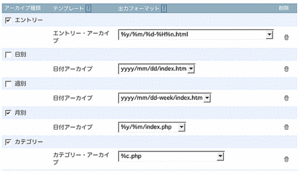
ファイル名を設定したい場合にはもうちょっと下の「アーカイブマッピング」。
日時を元に作れるようになったのはいいんだが、なかなか分かりづらいよ。。
こんな感じにしてみました。（前と同じようにはできたんだと思う）
前と変わっているのは「分」が%Mから%nになっているところ。
<a href="http://luna.s60.xrea.com/archives/images/settei.html" onclick="window.open('http://luna.s60.xrea.com/archives/images/settei.html','popup','width=500,height=291,scrollbars=no,resizable=no,toolbar=no,directories=no,location=no,menubar=no,status=no,left=0,top=0'); return false"><img src="http://luna.s60.xrea.com/archives/images/settei-thumb.gif" width="300" height="174" alt="" /></a>]]>
        
    </content>
</entry>
<entry>
    <title>3.2β</title>
    <link rel="alternate" type="text/html" href="http://luna.s60.xrea.com/archives/2005/07/14-1744.html" />
    <link rel="service.edit" type="application/atom+xml" href="http://luna.s60.xrea.com/x/mt-atom.cgi/weblog/blog_id=1/entry_id=60" title="3.2β" />
    <id>tag:luna.s60.xrea.com,2005://1.60</id>
    
    <published>2005-07-14T08:44:48Z</published>
    <updated>2005-10-03T00:00:12Z</updated>
    
    <summary>発表されたそうです。 &gt;&gt;SixPart まだまだ時間はかかりそうですけどね。 ...</summary>
    <author>
        <name>るな</name>
        
    </author>
            <category term="2MT" />
    
    <content type="html" xml:lang="ja" xml:base="http://luna.s60.xrea.com/">
        <![CDATA[発表されたそうです。
>><a href="http://www.sixapart.com/movabletype/beta/">SixPart</a>
まだまだ時間はかかりそうですけどね。
テンプレートが外に出せる様になったのかな？？
（適当に読んでるから間違えてたらごめんなさい）]]>
        
    </content>
</entry>

</feed> 

